Why CSS Should Be Used for Layout
Hacker News and Reddit have reopened the old debate between using tables or CSS for layout. It has been frustrating to see the one-sided nature of the discussion. Having worked directly with this issue for several years now, launched hundreds of websites and dozens of email campaigns, I'd like to address the issue with even-handedness. Here are the central points of debate against using CSS for layout.
1. CSS doesn't completely separate content from presentation
A central point of Ron Garret's "Why CSS should not be used for layout" is that CSS is flawed because you cannot rearrange the elements of an html document and maintain a consistent presentation. This is true, but it misses the point:
- CSS is for styling documents. The order in which elements appear on a page has meaning in a document, to rearrange them changes the very nature of the document. CSS was not designed to work independently of the linear ordering of HTML elements. It makes sense that you would need to alter your CSS when you alter the flow of your document.
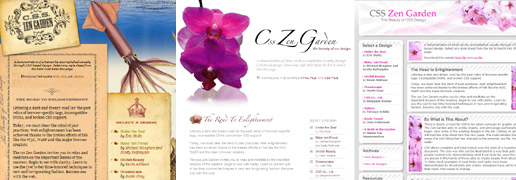
- When a document structure has been decided, CSS can display it in any fashion. CSS Zen Garden is proof enough of this. Since IE 5 has fallen out of use, it is no struggle for an experienced designer to put a properly marked-up document into any layout.
The concession to be made here is CSS doesn't completely separate content from presentation. However, it is a logical fallacy to extend that concession to the notion that Tables are better than CSS or even that they are no worse. At present, the HTML and CSS duo is the solution with the least degree of coupling between a hypertext document's data and its presentation. This loose coupling enables flexibility.
2. There are no benefits to using CSS for layout
Without question the benefits of CSS have been overstated. That being said, there are a couple of well known benefits of CSS that are worth mentioning:
- Context-sensitive Presentation – Using media types it is easy to apply different style sheets for screen, print and mobile devices. This multi-medium support is possible because of the loose coupling between HTML and CSS.
- Maintainability- It is easier to make changes when your layout is described in CSS. Your html is cleaner when using CSS for layouts and generally your elements are well labeled. (
- Better Accessibility - While it only helps a small audience, organizing your document based on its content rather than presentation helps those with screen readers.
- The most complex designs are easier with CSS - As soon as a design requires multiple levels of nested tables, it becomes much easier to lay out the design using CSS.
3. CSS has a terrible learning curve
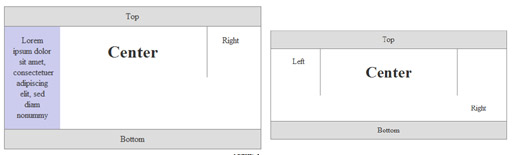
This is without question, the fairest knock against CSS. All reasonable layouts require the use of floats, clears and other magic that just aren't as easy to grasp as tables. The slow browser adoption of display: table; is the only reason this discussion really has legs. When CSS based layouts are as easy as Tables there will be no reason not to use it exclusively. Instead, the decision must be made with some calculus.
Scenarios where the advantages of CSS based layouts are less clear:
- You're not creating a document, you're creating an application. CSS was designed for documents. There are few, if any, semantic or accessibility reasons to do layout with CSS when the page is being built by Javascript.
- You have a proper server-side HTML templates layer. When it is easy to maintain HTML site-wide, it is somewhat easier to manage a table based layout.
- Maintainability is not a high priority. If you know a project will have a limited lifespan or will not need to be updated frequently, there is little benefit to using CSS.
It is important to note that once you've cleared the learning curve on CSS, you'll rarely find a reason to use tables for layout. While it is a challenge to learn the idioms of CSS layout, it is not a harder process inherently.
Conclusion
It is worth understanding the advantages that CSS gives for layout. In many situations they are very minor. A reasonable non-professional web designer that does not know CSS can safely choose to use tables to avoid a lot of headaches.
This doesn't mean professional web designers who know CSS and demand it be used are zealots. If you are in the business of laying out web pages, you should be doing it in CSS. There are enough proven advantages to doing so.
Related Posts


Comments
Namae
Personally, i'm really tired of all these nubies screaming about how "TAAABLES ARRRE BAAAAAD!!!11".I have a strong feeling, that all those CSS zealots just spend lots of time learning CSS hacks and tweaks just to get to know the same thing can be done with one table and no hacks at all. Just remember how many dirty hacks you need to make a simple 3-column layout!
And for god's sake, if my layout looks like a TABLE (most layouts does) why the hell can't i use for it?
Jennifer
I’m really struggling with whether to learn and use CSS for layout. I’ve been a designer for over 20 years and been using tables for layout for 13 years. Most of the sites I create are for small businesses averaging around 10 - 60 pages. (10-20 is most common.) I really like using CSS for formatting text, lists, positioning, etc. In my opinion, combining table layout with CSS works great. I’ve read the debates online. I’m not questioning the benefits of CSS in general. I use it and love it. What I’m trying to figure out is the benefits in using CSS for LAYOUT. Here are my questions which I'm hoping you can help…CSS Layout Advantages:
1) Easier Site-Wide Changes – CSS proponents claim site-wide changes are easier with CSS because you change one file and boom, it changes on all pages. I use Dreamweaver template files. I make a change to the template file and boom, it changes on all pages. What’s the difference?
2) Faster Load Times Because of Lighter Code – I remember load times being a major issue when I first got started but it doesn’t seem to be the case anymore with so few people on dialup. I can’t tell any discernable speed difference between a table layout and a CSS layout’s load time. (Yes, I like clean code too.) Heavy image use and Flash still seem to be the biggest factors in speed. If the human eye can’t tell any difference, then what’s the point? And server space/bandwidth doesn’t seem to be an issue anymore either. Space on the server for all of my client’s sites is generally 1/16 of capacity.
3) SEO – From what I can tell, search engines aren’t indexing or ranking CSS layouts higher than table layouts. The algorithms used for ranking most often are content and inbound links. The spiders are highly efficient at discerning code from content. So what difference does it make?
4) Separation of Style and Content – I guess this one is related #1, ease of updating? This is what Dreamweaver template files do. It separates style from content (editable/un-editable). I don’t know about you, but generally speaking what my clients want most often is to update the content. I don’t understand why it would be easier to update content using CSS more so than tables. (Remember, I DO use CSS for formatting.) If they want to tweak something in the design, again, piece of cake to do. Just change the template file. It’s not hard.
5) Greater Consistency – If you use template files and CSS, where is there inconsistency?
Disadvantages to using CSS for layout
1) Inconsistent Browser Support - Different browsers will render CSS layout differently as a result of browser bugs or lack of support for various CSS features. This is no small drawback!! It’s huge. I fought this very same battle using tables back in the 90s. Different browsers rendered the design differently. I really resented (and it sounds like many of you do too) all the time I had to spend to get a site to look as it was intended for ALL users. I REALLY don’t have any desire to fight that battle again. I know there are workarounds. But again, if I don’t see the overwhelming benefits, I won’t don my armor or sharpen my weapons.
My questions and concerns are genuine and not an effort to get CSS lovers to defend themselves. If you are designing using CSS for layout, cool! You are a part of an ever growing majority. Personally, if I could instantly convert a design into HTML, I’d do it. I have no great love for code. Right or wrong, I LOVE spending most of my time designing. For me, the rest is a necessary evil to get the design into the medium. So if you feel strong emotions regarding CSS layout, don’t respond. If you get where I’m coming from, please help me understand using logic.
Jennifer
Linda Lee
I enjoyed this topic. I started out designing using only table based sites but now I install and customize so many Wordpress blogs that I needed to learn basic CSS. I know enough now to do a little trouble shooting and rearranging but I can not create an entire site our of scratch. It is more a matter of time at this point to educate myself on CSS. I am so busy doing websites that I never have time to relearn and experiment with it. I know there are some very solid courses online. I do still run into the browser problem with some wordpress blogs and that is frustrating. I do see quite a bit of what you mentioned with things ending up at the bottom of the page when a new widget or element is added.
Thanks!
Kasper Sorensen
Great article! It's important to keep focus on the fact that the author is talking about LAYOUT, and not link colors, masthead banner etc.
There sis no doubt that for design specific stuff, CSS is way better than any HTML tags. Obviously if you have to assign an HTML attribute to every single link or H1 on your site, it quickly become tedious.
I can see to argument for using tables for quick websites that will only be displayed in browsers. But the accessibility argument is becoming more valid every day as the number people using iPhones (or any other device) to access websites, is increasing.
Joel Sutherland NMC team member
@Mat
I always use an external stylesheet. For pixel-perfect designs I first code the common elements. Then if there are specific pages that need additional work, I section off an area of my CSS file and address those.
Generally it is best to keep your CSS short and simple, with as few redundant parts as possible.
Mat
This is a good post and very thought out and presented well.
I do have a question for you, when you have to take PSD designs and convert them nearly pixel perfect, and each page is has slightly different margins, different header colors, different font sizes, but only the base framework is the same...what is the ideal CSS setup? If you create styles for every page, you're looking at thousands of lines of CSS when done, maintaining it is still not terribly easy (either you have one large CSS file, or multiple small ones), cross browser compatibility for picky clients really gets tricky.
In short, if there is no solid pixel by pixel template, but all are vaguely similar, how do you proceed? Style the common elements and then use inline styles to adjust margins and spacing, use multiple classes and generic CSS setups to handle color coding?
It's a tricky wire I have to walk a lot, and I'm not sure what's best to handle it.
Enjoyed the article, thanks!
Fernando
What book would you recommend for learning CSS and overcoming my evil tablephilic ways?
Preston D
It is important to note that once you've cleared the learning curve on CSS" ...
I'll assert that's an incredibly high bar to bear, especially when developers are tasked with the dual role of being both developer and designer.
Time and time again, I've worked on teams where initially we went with a pure CSS layout.
Inevitably, every few days, our site would end up looking like the image below #3, only the more common (and worse) offense is the right sidebar being kerplunked to the bottom of the page. You'll notice this often in pure CSS WordPress layouts, for example.
People (often-times not developers, but content creators) are pushing the limits of what the CSS designers expect.
Inevitably you get a b0rked looking site. Switching to tables, on the other hand, has almost universally provided a better, more versatile experience in this area.
(sorry for the long rant btw)
But also -- always on the back of my mind is, what are these (sorry), but "css nazis" thinking, are they honestly worried about a client "Viewing Source" and --OMG-- the shock and awe, tables! ;)"
Sven Helmberger
Re: You're not creating a document, you're creating an application
At my company we're currently working on some kind of model based AJAX application engine.. A very high abstraction model of an application is compiled into an actual running application.
The whole web layer is almost exclusively built around standards based CSS. Lots of semantic classes and meta data annotations, progressive enhancement etc etc
Never was the advantage of CSS and progressive enhancement clearer to me than in this project.
S.K.
I'm late to the web development game, so I learned table based layouts after learning CSS layouts. I had to learn it because my job at the time required producing a bunch of email templates.
Until email clients catch up to browsers in web standards, well rounded webdevs need proficiency in both methods so I don't understand the conflict between them.
Mark
Good points! I know when I was just learning html with tables way back when, it was actually kind of a pain in the butt. I mean there's all these little quicks with padding and margins that have to be worked out, and I was constantly messing up my tags after the tables were nested really deep.
At the same time now that I've learned more CSS and with the use of frameworks, CSS has become really easy to use for me...
Dan Hensgen
Javascript libraries like jQuery are so fused with CSS, CSS layouts are an advantage even in creating applications.
Rob Glazebrook
I think point one is the most critical for tablephiles to understand. The argument that when you change your XHTML, your CSS layout breaks -- and therefore CSS is bad -- is fundamentally flawed. If I went into my HTML and randomly started moving around tr and td tags, guess what? My table is going to look different.
No, CSS does not allow a perfect separation between content and presentation. Such a thing doesn't really exist. But that doesn't mean we should all cower under our nested tables and font tags until this whole progress" fad blows over."
Leave a comment